
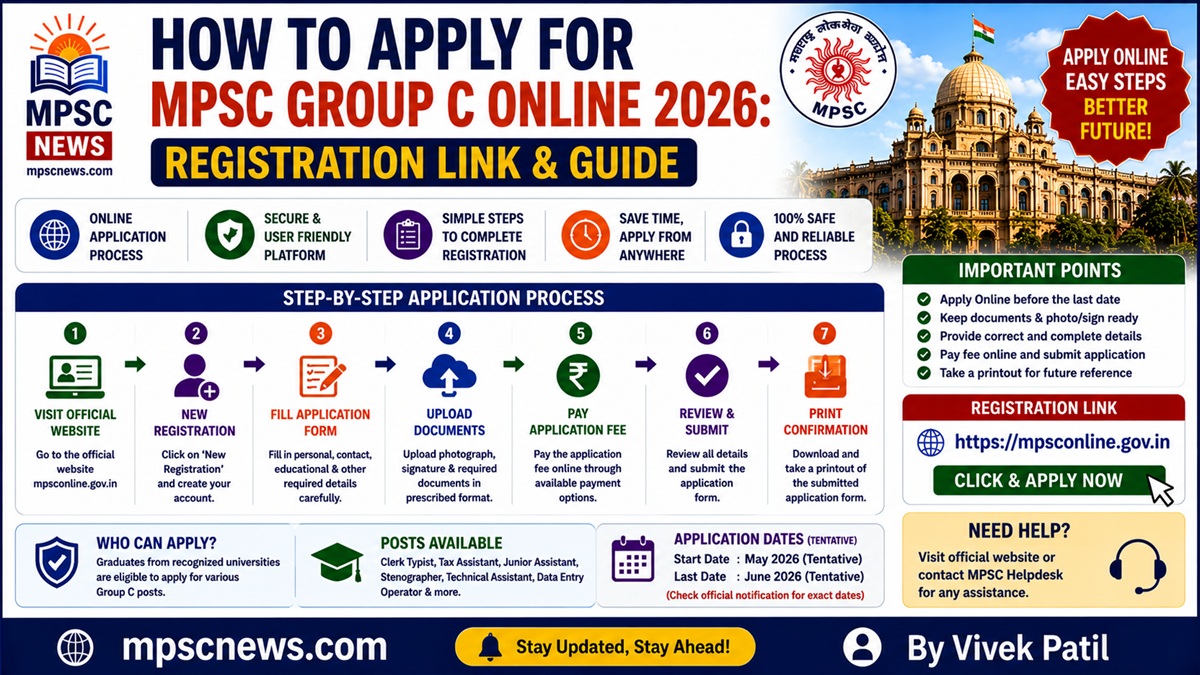
How to Apply for MPSC Group C Online 2026: Best Registration Guide
Quick Answer
Understanding How to Apply for MPSC Group C is essential for candidates seeking recruitment to Clerk-Typist, Tax Assistant, Industry Inspector, Technical Assistant, and other Group C posts. Candidates must complete One-Time Registration (OTR), fill the online application form, upload documents, pay the prescribed fee, and submit the application through the official MPSC Online Application System.
Introduction
Many candidates lose valuable opportunities because of mistakes during the online application process. Learning How to Apply for MPSC Group C correctly helps avoid application rejection and ensures successful registration.
The Maharashtra Public Service Commission accepts applications only through its official online portal. Candidates should keep all required documents ready before starting the application process.
MPSC Group C Application Overview
| Particular | Details |
|---|---|
| Recruitment Authority | Maharashtra Public Service Commission |
| Examination | MPSC Group C Services Examination |
| Application Mode | Online |
| Registration System | One-Time Registration (OTR) |
| Official Portal | MPSC Online Application System |
| Official Website | MPSC |
Documents Required Before Applying
Candidates should keep the following documents ready:
Essential Documents
- Aadhaar Card
- Graduation Certificate
- HSC/SSC Certificates
- Category Certificate (if applicable)
- Domicile Certificate
- Passport Size Photograph
- Signature Scan
- Typing Certificate (for Clerk-Typist posts)
- Valid Mobile Number
- Active Email ID
Having all documents prepared beforehand makes the application process faster and reduces errors.
How to Apply for MPSC Group C
Step-by-Step Registration Guide
Step 1: Visit the Official Portal
Open the official MPSC Online Application System and click on “New User Registration” if you are a first-time applicant.
Step 2: Complete One-Time Registration (OTR)
Enter:
- Full Name
- Mobile Number
- Email Address
- Personal Details
- Identity Information
After verification, your OTR profile will be created.
Step 3: Login to the Portal
Use your registered credentials to access the MPSC dashboard.
Step 4: Select the Group C Examination
Choose the relevant MPSC Group C recruitment notification from the available advertisements.
Step 5: Fill the Group C Application Form
Enter:
- Personal Information
- Educational Qualification
- Category Details
- Communication Address
- Post Preferences
Carefully verify every field before proceeding.
Step 6: Upload Required Documents
Upload scanned copies of:
- Photograph
- Signature
- Educational Certificates
- Category Certificates
- Typing Qualification Certificate (if required)
Ensure the uploaded files meet the prescribed specifications.
Step 7: Pay the Application Fee
Candidates can complete payment through:
- Debit Card
- Credit Card
- Net Banking
- UPI
- SBI Challan (where applicable)
Fee payment must be completed before the deadline.
Step 8: Verify and Submit
Review all entered details carefully before final submission.
Step 9: Download Confirmation
After successful submission, download and save:
- Application Form
- Payment Receipt
- Registration Confirmation
These documents may be required during document verification.
MPSC Group C Online Application: Important Tips
Best Practices
- Apply well before the last date.
- Use an active email address.
- Verify educational details carefully.
- Keep scanned documents ready.
- Save your application number safely.
- Regularly check application status.
Common Reasons for Application Rejection
Common Mistakes
- Incorrect personal details
- Wrong category selection
- Invalid document uploads
- Incomplete fee payment
- Missing required certificates
- Typographical errors
Avoiding these mistakes improves the chances of successful application acceptance.
Application Fee Details
The application fee varies according to category and examination stage.
| Category | Fee Status |
| Open Category | As per notification |
| Reserved Category | Concessional Fee |
| Orphan Category | Applicable concessions |
Candidates should verify the latest fee structure from the official notification before payment.
How to Track Application Status
After submission:
- Login to the MPSC portal.
- Open your dashboard.
- Check application status.
- Verify payment confirmation.
- Monitor future updates.
Candidates should regularly visit the portal for admit card and examination announcements.
Comparison Table
| Application Stage | Mandatory |
| OTR Registration | Yes |
| Application Form | Yes |
| Document Upload | Yes |
| Fee Payment | Yes |
| Final Submission | Yes |
| Confirmation Download | Recommended |
Pros and Cons
Pros
- Fully online application process
- Easy registration system
- Secure payment methods
- Quick application tracking
- Transparent recruitment process
Cons
- Technical issues during peak traffic
- Strict document requirements
- Non-refundable fees in most cases
- Application rejection for incorrect details
Frequently Asked Questions
How to Apply for MPSC Group C?
Candidates must complete OTR registration, fill the online application form, upload documents, pay the fee, and submit the application through the official portal.
What is the MPSC Group C online application process?
The process includes registration, form filling, document upload, fee payment, and final submission.
Is OTR mandatory for MPSC Group C?
Yes, candidates must complete One-Time Registration before applying.
Can I apply offline?
No, applications are accepted only through the online portal.
Which documents are required?
Educational certificates, identity proof, photograph, signature, and category certificates are generally required.
Can I edit the application after submission?
Candidates should check the official correction policy announced by MPSC.
How do I pay the application fee?
Payment can be made online through approved payment methods.
Should I keep a copy of the application?
Yes, candidates should download and save the confirmation page.
What happens after submitting the application?
Candidates should wait for admit card and examination updates.
Where can I apply online?
Applications must be submitted through the official MPSC Online Application System.
Final Verdict
Understanding How to Apply for MPSC Group C is important for completing the registration process successfully. Candidates should register early, upload accurate documents, pay the application fee on time, and carefully review all details before final submission. Following the official guidelines can prevent application rejection and ensure a smooth recruitment experience.
Official Resources:
- MPSC Official Website – https://mpsc.gov.in/
- MPSC Online Application Portal – https://mpsconline.gov.in/
- MPSC Notifications – https://mpsc.gov.in/adv_notification/8
Related Articles:
- MPSC Group C Notification 2026 –
https://mpscnews.com/mpsc-group-c-notification-2026/ - MPSC Group C Vacancy Details 2026 –
https://mpscnews.com/mpsc-group-c-vacancy-details-2026/ - MPSC Group C Eligibility Criteria 2026 –
https://mpscnews.com/mpsc-group-c-eligibility-criteria-2026/ - MPSC Group C Salary Structure 2026 –
https://mpscnews.com/mpsc-group-c-salary-structure-2026/ - MPSC Group C Selection Process 2026 –
https://mpscnews.com/mpsc-group-c-selection-process-2026/ - MPSC Previous Year Question Papers –
https://mpscnews.com/mpsc-previous-year-question-papers/ - MPSC Syllabus PDF –
https://mpscnews.com/mpsc-syllabus-pdf/ - MPSC Exam Calendar 2026 –
https://mpscnews.com/mpsc-exam-calendar-2026/ - Maharashtra Government Jobs –
https://mpscnews.com/maharashtra-government-jobs/

- MPSC Normalization Process Explained Clearly: How Scores Are Calculated in Multi-Shift Exams 2026 - August 6, 2026
- MPSC AI-Based Exam Monitoring 2027: How Artificial Intelligence Will Change Recruitment - August 6, 2026
- MPSC Optional Subject Removed from State Services Mains 2027: Official Changes Explained - July 27, 2026